QwikCa New Dashboard v2.0
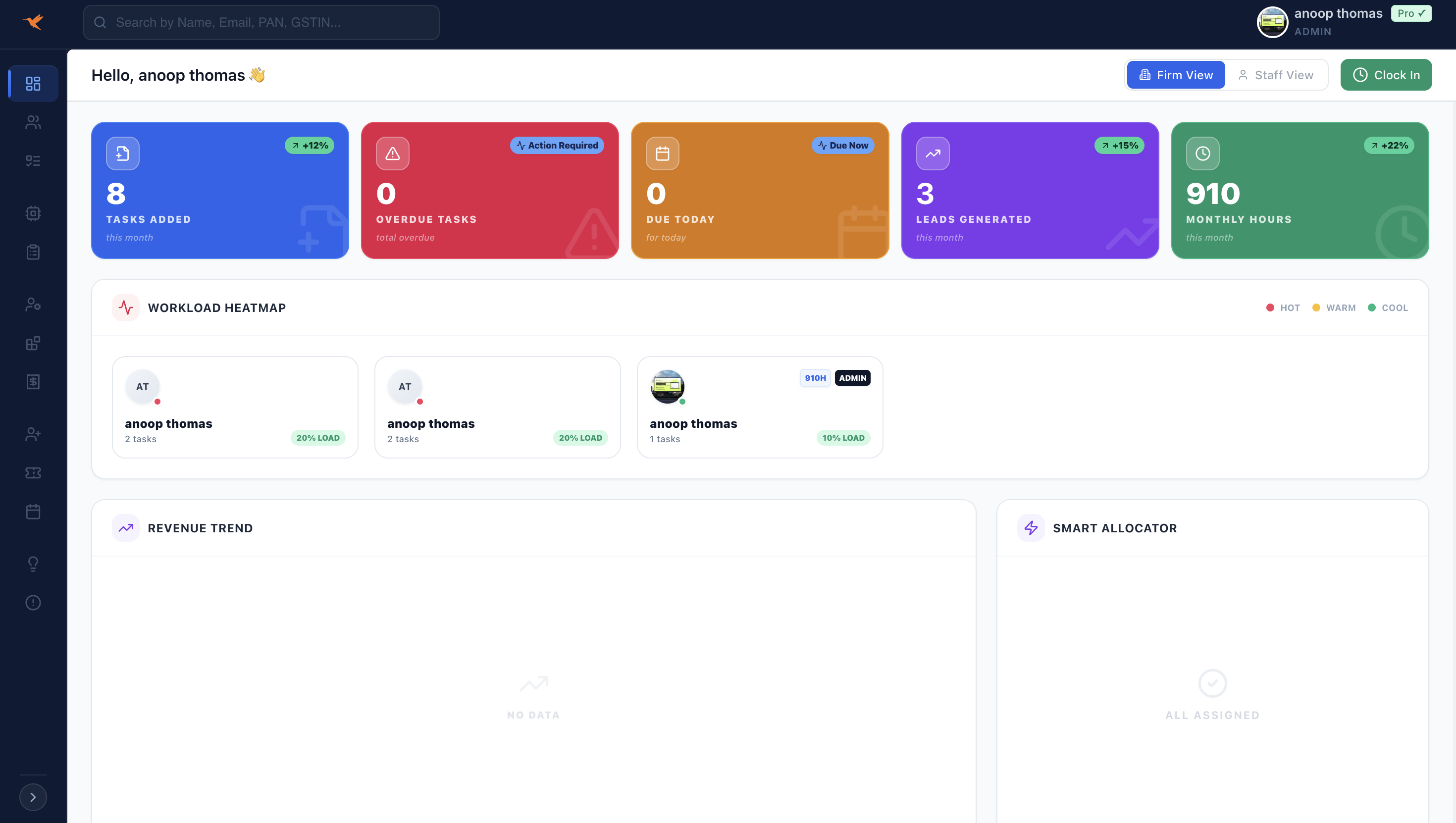
Latest QwikCA Features: Staff View, Admin Dashboard, Auto Task Suggestions & Smart Task Analytics
Modern CA firms are managing hundreds of client deadlines every month — GST filings, income tax returns, compliance work, audits, and advisory services. Without the right system, managing tasks across multiple staff members becomes chaotic.
This is where QwikCA is evolving rapidly. The latest QwikCA new features are designed to improve workflow visibility, automate task management, and help CA firms operate more efficiently.
In this guide, we will explore the newest features introduced in QwikCA including:
- Dedicated Staff View
- Powerful Admin Dashboard
- Auto Task Suggestions powered by workflow intelligence
- Task Statistics & Analytics
- Complete workflow visibility for CA firms
If you are exploring modern CA practice management software, these features make QwikCA a powerful solution for growing firms.
Why CA Firms Need Advanced Practice Management Software
Traditional methods like Excel sheets, WhatsApp reminders, and manual task tracking are no longer sustainable for growing accounting firms.
A smart CA management system like QwikCA helps firms:
- Track all compliance tasks in one place
- Monitor staff productivity
- Prevent deadline misses
- Automate task workflows
- Improve client service
1. Staff View – Simplified Task Management for Team Members
One of the most requested QwikCA new features is the dedicated Staff View.
This interface is designed specifically for employees working inside the firm.
What Staff Can See
- Assigned tasks
- Upcoming deadlines
- Pending compliance work
- Task priority levels
- Status updates
Benefits of Staff View
- Eliminates confusion about assigned work
- Improves accountability
- Helps staff prioritize deadlines
- Reduces dependency on managers
Instead of constantly asking managers for updates, staff members now get a clear dashboard showing exactly what they need to work on.
2. Admin Dashboard – Complete Control for Firm Owners
The Admin Dashboard gives firm partners and managers a bird's-eye view of everything happening inside the practice.
This feature allows leadership to monitor operations, staff productivity, and task completion rates.
Admin Dashboard Highlights
- Firm-wide task overview
- Employee productivity metrics
- Deadline tracking
- Pending compliance alerts
- Client task distribution
This visibility allows managers to prevent missed deadlines and allocate resources efficiently.
3. Auto Task Suggestions – Smart Workflow Automation
Another powerful addition in the QwikCA new features list is Auto Task Suggestion.
Instead of manually creating every task, QwikCA intelligently suggests tasks based on compliance cycles and previous workflows.
How Auto Task Suggestions Work
- Detects compliance schedules (GST, ITR, TDS)
- Automatically suggests recurring tasks
- Recommends workflow sequences
- Reduces manual task entry
Benefits
- Save hours of manual task creation
- Standardize firm processes
- Reduce human errors
- Ensure no compliance task is missed
Automation like this is becoming essential in modern practice management tools for accountants.
4. Task Statistics & Performance Analytics
Data-driven firms make better decisions. That’s why QwikCA now includes detailed Task Statistics.
This feature provides insights into how work flows through your firm.
Analytics Included
- Total tasks completed
- Pending tasks
- Staff performance
- Task completion time
- Department productivity
Why This Matters
- Identify bottlenecks in workflow
- Improve team efficiency
- Optimize resource allocation
- Measure firm performance
Feature Comparison Table
| Feature | Purpose | Main Benefit |
|---|---|---|
| Staff View | Task management for employees | Clear task visibility |
| Admin Dashboard | Firm-level control panel | Operational visibility |
| Auto Task Suggestions | Workflow automation | Save time and reduce errors |
| Task Statistics | Performance analytics | Better decision making |
Who Are These QwikCA Features For?
These improvements are especially valuable for:
- Chartered Accountant firms
- Tax consultants
- GST practitioners
- Accounting outsourcing firms
- Compliance management teams
Whether you manage 50 clients or 5,000 clients, these tools help streamline operations.
Key Benefits for CA Firms
- Better task tracking
- Improved staff productivity
- Reduced compliance risk
- Centralized workflow management
- Real-time operational insights
Frequently Asked Questions
What is QwikCA?
QwikCA is a modern practice management platform designed for Chartered Accountant firms to manage tasks, compliance, clients, and staff workflows.
Does QwikCA support task automation?
Yes. The new Auto Task Suggestion feature automatically recommends tasks based on compliance cycles and previous workflow patterns.
Can partners monitor staff performance?
Yes. The Admin Dashboard and Task Statistics allow firm partners to track productivity and task completion metrics.
Is QwikCA suitable for large firms?
Yes. The platform scales well for both small practices and large CA firms handling thousands of compliance tasks.
Conclusion
The latest QwikCA new features demonstrate how modern practice management software is evolving to meet the needs of today's accounting firms.
With tools like:
- Staff View
- Admin Dashboard
- Auto Task Suggestions
- Task Analytics
CA firms can dramatically improve productivity, streamline operations, and deliver better client service.
Start Managing Your CA Firm Smarter
Discover how QwikCA can simplify compliance, automate workflows, and boost your firm's efficiency.
Explore QwikCA Features